Brewista Smart Scale III – 0.1 g / 2000 g – USB-C
⚖️ Faster. Tougher. Smaller. Still Brilliantly Practical.
The Brewista Smart Scale III takes one of the most popular compact barista scales and makes it:
⚡ Faster
💪 More robust
📐 More compact
☕ Better suited to modern espresso and filter workflows
At only:
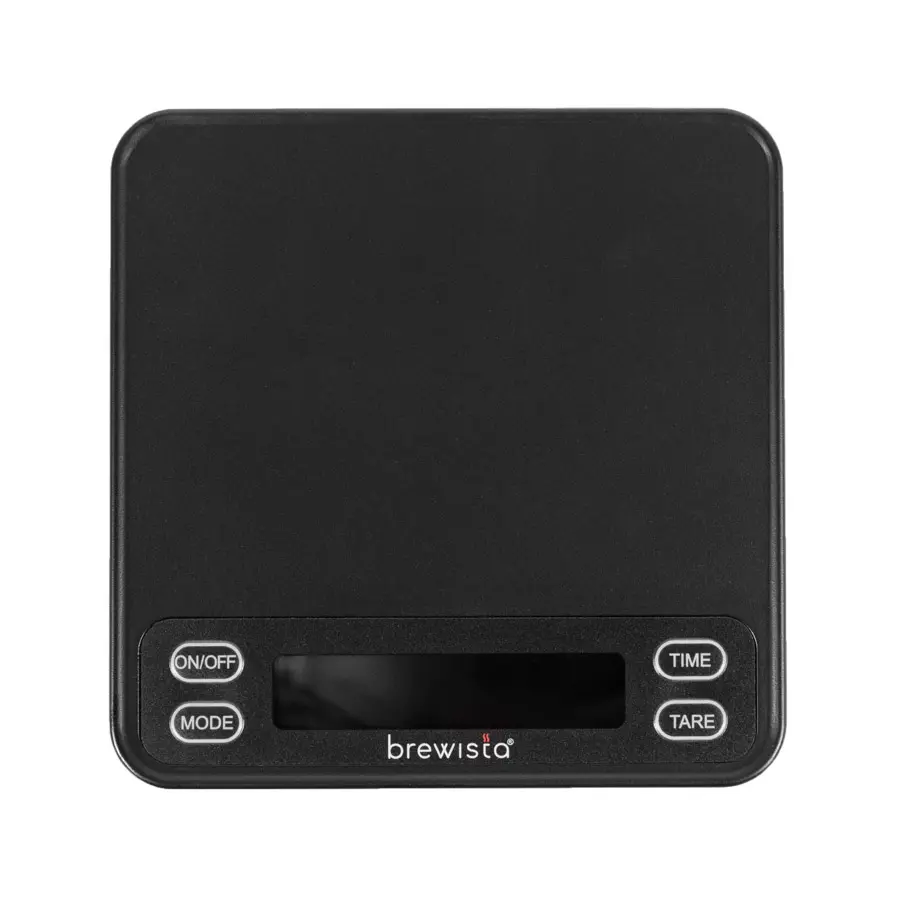
10.5 × 10.5 × 1.7 cm
it fits comfortably underneath many espresso machines, yet still offers a generous:
2,000 g capacity
with:
0.1 g resolution.
Five operating modes let you choose anything from completely manual weighing to automatic tare and timer workflows.
Use it for:
☕ Espresso
💧 V60
🌸 ORIGAMI
🌀 AeroPress
🚀 Pulsar
☕ Small batch brews
🧪 Recipe development
without needing an app or Bluetooth connection.
📋 Quick Menu
- ⚖️ 0.1 g resolution
- 📦 2,000 g maximum capacity
- 📐 Compact 105 × 105 × 17 mm
- 🪶 Only approx. 163 g
- ⏱️ Integrated timer
- 🔄 5 operating modes
- ☕ Automatic espresso workflows
- ✋ Fully manual mode
- 🎯 Auto tare
- ⏱️ Auto timer options
- 💡 Backlit LCD
- 🔢 Grams or ounces
- 💤 Adjustable auto-off
- 🔋 Rechargeable lithium-ion battery
- ⚡ USB-C charging
- 💦 Water-resistant nano coating
- 🧲 Protective silicone pad
- 🛡️ Protective cover / tray included
- 👃 CoffeeNose workflow tips
- 🫘 WB.coffee coffee pairings
- 🎓 Espresso & filter workshops
⚖️ 0.1 Gram Resolution
The Smart Scale III measures in:
0.1 g increments
across a range up to:
2,000 g / 70 oz.
That makes it precise enough for:
Espresso
🫘 18.0 g coffee
☕ 40.0 g beverage
and still strong enough for:
Filter
💧 Brewer
☕ Server
🫘 Coffee
+
💧 Several hundred grams of brewing water.
One scale can therefore cover most everyday specialty-coffee brewing.
👃 Why 0.1 g Matters More for Coffee Than Water
When pouring:
400 g of water
you probably don't care much whether the scale reads:
400.0
or:
400.1.
But with espresso dose:
17.2 g
versus:
18.0 g
can noticeably change:
📏 Puck depth
💧 Flow resistance
⏱️ Extraction time
☕ Brew ratio
So the resolution is particularly useful where small differences actually matter.
🔄 Five Smart Operating Modes
This is where Brewista's Smart Scale earns its name.
The Smart Scale III offers:
4 automatic modes + 1 manual mode.
You can choose how much of the workflow you want the scale to automate.
1️⃣ Mode 1 – Fully Manual
You control everything.
You decide when to:
⚖️ Tare
and:
⏱️ Start or stop the timer.
Perfect for:
💧 Pour-over
🌀 AeroPress
☕ Cupping preparation
🧪 Recipe experiments
or anyone who simply wants the scale to:
do exactly what they're told.
2️⃣ Mode 2 – Auto Tare + Manual Timer
Place the cup on the scale.
The scale:
automatically tares.
You then:
manually start the timer.
This removes one step while leaving timing under your control.
Useful for espresso when you prefer to start timing at:
☕ pump activation
rather than relying on an automatic trigger.
3️⃣ Mode 3 – Auto Tare + Auto Timer
Designed for a more automated espresso workflow.
The scale manages:
⚖️ tare
and:
⏱️ timing
so you can concentrate on:
👀 Flow
☕ Extraction
⚙️ Grinder changes.
4️⃣ Mode 4 – Auto Tare Only
Sometimes all you want automated is:
zeroing the cup.
No timer automation.
No extra behaviour.
Put the cup down.
Let the scale tare.
Then brew however you like.
5️⃣ Mode 5 – Immediate Auto Timer + Auto Tare
The fifth mode combines:
⚖️ automatic tare
with:
⏱️ an automatic timing workflow
for fast espresso preparation.
This is particularly convenient when you're making multiple shots and want to remove repetitive button pressing from the workflow.
👃 CoffeeNose – Automatic Is Not Always Better
Automation should make brewing easier.
It shouldn't force you into somebody else's workflow.
For espresso:
automatic modes
can be brilliant.
For recipe development:
manual mode
may actually be preferable because you decide exactly when time starts.
That is one reason we like having five modes instead of one supposedly “smart” mode.
Use the one that fits what you're doing.
⏱️ Integrated Timer
Weight tells you:
how much.
The timer tells you:
how long.
Those two numbers together are fundamental for repeatable coffee brewing.
For espresso:
18.0 g in
⬇️
40.0 g out
⬇️
in 27 seconds
gives you useful information.
For filter:
15 g coffee
⬇️
250 g water
⬇️
2:45 total brew time
creates a recipe you can reproduce tomorrow.
👃 Time Is Diagnostic – Not a Flavour Target
Don't obsess over:
“espresso must take exactly 30 seconds.”
A delicious:
24-second shot
is better than an unpleasant:
30-second shot.
Use time to understand what happened.
Use taste to decide whether it was good.
☕ Compact Enough for Espresso
The Smart Scale III measures just:
105 × 105 mm
and is only:
17 mm high.
That makes it particularly useful underneath machines where:
📐 drip tray space is limited
or:
☕ taller cups leave little clearance.
At approximately:
163 g
it is also easy to move between:
☕ Espresso machine
💧 Filter station
🎒 Travel bag.
☕ Espresso Workflow
A simple starting recipe:
🫘 Coffee
18.0 g
☕ Espresso
36–42 g
⏱️ Time
Use approximately 25–30 seconds as diagnostic information rather than a rigid rule.
Then taste.
Too fast, thin and sharp?
Try:
⚙️ Finer grind.
Barely flowing and drying?
Try:
⚙️ Coarser.
Sweet and balanced?
Stop moving the grinder.
💧 Pour-Over Workflow
Use manual mode for maximum control.
A simple starting recipe:
🫘 Coffee
15 g
💧 Water
250 g
🌡️ Temperature
Around 92–96°C depending on coffee
⏱️ Total brew
Typically somewhere around 2:30–3:15 depending on brewer, coffee and grind.
The scale lets you control:
⚖️ Ratio
💧 Individual pours
⏱️ Timing
while your tongue determines whether the recipe works.
🌀 Great with AeroPress
AeroPress recipes vary enormously.
You may use:
🫘 12 g
🫘 15 g
🫘 20 g
with very different:
💧 Water quantities
⏱️ Immersion times
🌡️ Temperatures.
A scale and timer make those recipes repeatable.
Pair the Smart Scale III with our:
Press It Real Good
AeroPress workshop to understand what those numbers actually change in the cup.
💡 Backlit LCD
Unlike app-dependent scales, Brewista gives you all the relevant information directly on the scale through its:
backlit LCD display.
You can see:
⚖️ Weight
⏱️ Timer
🔄 Active mode
🔋 Battery status
without:
📱 opening an app
🔵 pairing Bluetooth
☁️ creating an account.
Sometimes simple really is better.
🔢 Grams or Ounces
The Smart Scale III can display:
g – grams
or:
oz – ounces.
At Amsterdam Coffee Lab and WB.coffee we strongly recommend:
grams.
Coffee recipes become vastly easier when:
🫘 Coffee
💧 Water
☕ Espresso yield
all use the same measurement system.
💤 Adjustable Auto-Off
The Smart Scale III includes adjustable automatic shutoff.
According to the Brewista guide, it can be configured for approximately:
60 seconds
120 seconds
180 seconds
or:
disabled.
Useful distinction.
For quick espresso work:
⚡ Auto-off saves battery.
For long manual brews:
💧 Disable it if you don't want the scale deciding that your coffee session is over.
🔋 Rechargeable Lithium-Ion Battery
No pile of disposable AAA batteries.
The Smart Scale III uses an internal:
rechargeable lithium-ion battery
and charges through:
USB-C.
Much more convenient for a tool used every day.
Keep the charging port dry before connecting the cable.
💦 Water-Resistant Nano Coating
Coffee scales live dangerous lives.
There is always:
💧 Brewing water
☕ Espresso
🫗 Overflow
🧼 Cleaning water
somewhere nearby.
The Smart Scale III uses a:
water-resistant nano coating
to improve protection during normal coffee use.
But:
⚠️ it is NOT waterproof.
Do not:
❌ Immerse it
❌ Rinse it under the tap
❌ Leave standing water around the controls or charging port.
👃 CoffeeNose – Water Resistant ≠ Waterproof
This distinction matters.
A few splashes?
That's what the protection is there for.
Half an espresso pitcher poured directly over the scale?
Dry it immediately.
A trip through the dishwasher?
Please don't.
Clean electronic coffee equipment with a:
lightly damp cloth
rather than treating it like a plate.
🧲 Silicone Protective Pad
The supplied silicone pad helps protect the weighing surface against:
🔥 Heat
💦 Drips
☕ Coffee residue
🖐️ Slipping vessels.
Brewista specifically describes the pad as adding water and heat resistance to the scale platform.
It is removable, so cleaning is much easier.
🛡️ Protective Cover / Tray
The package also includes a:
protective cover / tray.
During transport it protects the scale.
During brewing it can provide an additional practical working surface.
This is especially useful when the scale travels between:
🏠 Home
☕ Coffee bar
🎓 Workshop
🎒 Holiday.
🆚 Smart Scale III vs a Basic Kitchen Scale
A normal kitchen scale can weigh coffee.
But it is usually designed for:
🥣 Flour
🥕 Vegetables
🍳 Cooking.
The Brewista adds coffee-specific advantages:
⚖️ 0.1 g resolution
⏱️ Integrated timer
☕ Espresso automation
📐 Compact footprint
💦 Water resistance
🔋 Rechargeable battery.
If you only weigh:
60 g coffee for a Moccamaster
a kitchen scale may be perfectly sufficient.
If you're measuring:
espresso output in real time
the difference becomes much more obvious.
🆚 Brewista Smart Scale III vs TIMEMORE Black Mirror DOT
Both are compact.
The philosophy is very different.
⚖️ Brewista Smart Scale III
Choose it when you want:
💡 Built-in display
🔘 Physical controls
☕ Five automatic/manual modes
📱 No phone required
📦 2,000 g capacity.
⚫ TIMEMORE DOT
Choose it when you want:
🎒 Extreme portability
📱 App-based interface
📈 Flow-rate graphs
📝 Brew logging
🪶 Ultra-low weight.
CoffeeNose choice 👃
Want to simply:
put it down and brew?
Brewista.
Want to:
analyse your pour curve on your phone?
DOT.
⚙️ Cross-Sell – A Good Grinder
A scale controls:
quantity.
A grinder controls:
particle size.
Combine the Smart Scale III with:
⚙️ Fellow Opus 2
⚙️ Comandante C40
⚙️ TIMEMORE grinders
⚙️ Your dedicated espresso grinder
depending on whether you're brewing:
☕ Espresso
💧 Filter
or:
☕ both.
🥤 Cross-Sell – Dosing Cup
For espresso:
Grinder
⬇️
Dosing cup
⬇️
Portafilter
⬇️
Scale
⬇️
Brew.
A dosing cup keeps the workflow clean while the Brewista verifies:
⚖️ what went in
and:
⚖️ what came out.
💧 V60 / ORIGAMI / Pulsar
The 2 kg capacity is generous enough for many complete filter setups.
Use it underneath:
💧 Hario V60
🌸 ORIGAMI
🔀 Switch
🚀 NextLevel Pulsar
🌀 AeroPress.
The compact footprint is particularly nice with small one-cup brewers.
A versatile coffee for learning brew ratios:
FJ – Fruity & Juicy
Try:
15 g → 225 g
1:15
then:
15 g → 250 g
1:16.7
and taste how:
🍓 Fruit
🍯 Sweetness
👅 Body
change.
The scale makes the experiment repeatable.
For a more delicate filter profile:
FF – Fruity & Floral
keep:
⚖️ Dose
💧 Water
🌡️ Temperature
consistent while changing only:
⚙️ grind size.
That is how a scale becomes a learning tool rather than merely a number display.
Using the Brewista primarily underneath your espresso machine?
Try:
CN – Chocolaty & Nutty
with a starting recipe around:
18 g in
to:
38–42 g out.
Then adjust according to taste.
The scale gives you numbers.
Our Espresso Essentials workshop at Amsterdam Coffee Lab in Weesp teaches you what they mean.
Explore:
⚙️ Grind size
⚖️ Dose
☕ Yield
⏱️ Extraction time
🌀 Distribution
🔘 Tamping
👅 Taste
🥛 Milk steaming.
Once you understand:
dose in → beverage out
espresso becomes dramatically easier to troubleshoot.
Using the Brewista for filter coffee?
During Pour ’n Drip, learn how:
⚖️ Ratio
💧 Pouring
⚙️ Grind
🌡️ Temperature
🌀 Agitation
⏱️ Contact time
interact.
A scale lets you repeat the recipe.
Training helps you understand whether it is worth repeating.
🔧 Technical Specifications
Product: Brewista Smart Scale III
Model: BSSRB3
EAN / UPC: 810060501047
Capacity: 2,000 g / 70 oz
Resolution: 0.1 g
Units: grams / ounces
Timer: Yes
Operating modes: 5 – 4 automatic + 1 manual
Tare: Manual and automatic depending on mode
Display: Backlit LCD
Auto-off: Approx. 60 / 120 / 180 sec or disabled
Dimensions: 105 × 105 × 17 mm
Weight: Approx. 163 g
Materials: ABS resin + stainless steel
Battery: Rechargeable lithium-ion
Charging: USB Type-C
Surface protection: Water-resistant nano coating
Waterproof: No.
📦 Included
Inside the box:
⚖️ Brewista Smart Scale III
🛡️ Protective cover / tray
🧲 Silicone protective pad
🔌 USB-C charging cable
📖 Instruction manual.
✅ Perfect For
The Brewista Smart Scale III is particularly suited to:
✔️ Home baristas
✔️ Espresso brewing
✔️ Pour-over coffee
✔️ AeroPress
✔️ V60
✔️ ORIGAMI
✔️ Pulsar
✔️ Small servers
✔️ Coffee professionals
✔️ Workshops
✔️ Travelling baristas
✔️ Anyone wanting automatic espresso modes without needing an app.
❤️ Why We Like It at WB.coffee
Coffee scales increasingly seem to fall into two categories:
extremely basic
or:
connected to an app with seventeen graphs.
The Brewista sits in a useful middle ground.
You get:
⚖️ proper 0.1 g precision
⏱️ a timer
🔄 useful automation
💡 a real display
💦 sensible protection against coffee-bar splashes
🔋 USB-C charging
without needing:
📱 Bluetooth
☁️ an account
📊 a dashboard
just to weigh an espresso.
We also like the physical dimensions.
At only:
105 × 105 × 17 mm
it is genuinely compact enough for espresso, while the:
2 kg capacity
means it doesn't become useless the moment you put a dripper and server on top.
CoffeeNose verdict 👃
For espresso, use the smart modes when they genuinely improve your workflow.
For experiments, switch back to manual.
And remember:
the scale tells you what happened.
It does not tell you whether the coffee tastes good.
That's still your job.
📍 Coffee Scales & Specialty Coffee in Weesp
At WB.coffee / Amsterdam Coffee Lab in Weesp, combine your Brewista Smart Scale III with:
⚙️ Espresso & filter grinders
🥤 Dosing cups
🌀 WDT tools
💧 V60, ORIGAMI & manual brewers
🚀 NextLevel brewers
🌀 AeroPress
🫖 Pouring kettles
🫘 Fresh WB.coffee blends & single origins
🎓 Espresso & filter workshops
👅 Coffee tastings & sensory experiences
🥡 Specialty coffee from the tasting menu @ Amsterdam Coffee Lab
Measure precisely.
Brew consistently.
Then taste.
![[BSSRB3] Brewista Smart Scale III 5.webp](/web/image/product.image/9812/image_128/%5BBSSRB3%5D%20Brewista%20Smart%20Scale%20III%205.webp?unique=a85333c)
![[BSSRB3] Brewista Smart Scale III 2.webp](/web/image/product.image/9809/image_128/%5BBSSRB3%5D%20Brewista%20Smart%20Scale%20III%202.webp?unique=a85333c)
![[BSSRB3] Brewista Smart Scale III 6.webp](/web/image/product.image/9810/image_128/%5BBSSRB3%5D%20Brewista%20Smart%20Scale%20III%206.webp?unique=a85333c)
![[BSSRB3] Brewista Smart Scale III 8.webp](/web/image/product.image/9811/image_128/%5BBSSRB3%5D%20Brewista%20Smart%20Scale%20III%208.webp?unique=a85333c)
![[BSSRB3] Brewista Smart Scale III 7.webp](/web/image/product.image/9813/image_128/%5BBSSRB3%5D%20Brewista%20Smart%20Scale%20III%207.webp?unique=a85333c)
![[BSSRB3] Brewista Smart Scale III 4.webp](/web/image/product.image/9814/image_128/%5BBSSRB3%5D%20Brewista%20Smart%20Scale%20III%204.webp?unique=a85333c)
![[BSSRB3] Brewista Smart Scale III 3.webp](/web/image/product.image/9815/image_128/%5BBSSRB3%5D%20Brewista%20Smart%20Scale%20III%203.webp?unique=a85333c)

![[BSSRB3] Brewista Smart Scale III 5.webp](/web/image/product.image/9812/image_1024/%5BBSSRB3%5D%20Brewista%20Smart%20Scale%20III%205.webp?unique=a85333c)
![[BSSRB3] Brewista Smart Scale III 2.webp](/web/image/product.image/9809/image_1024/%5BBSSRB3%5D%20Brewista%20Smart%20Scale%20III%202.webp?unique=a85333c)
![[BSSRB3] Brewista Smart Scale III 6.webp](/web/image/product.image/9810/image_1024/%5BBSSRB3%5D%20Brewista%20Smart%20Scale%20III%206.webp?unique=a85333c)
![[BSSRB3] Brewista Smart Scale III 8.webp](/web/image/product.image/9811/image_1024/%5BBSSRB3%5D%20Brewista%20Smart%20Scale%20III%208.webp?unique=a85333c)
![[BSSRB3] Brewista Smart Scale III 7.webp](/web/image/product.image/9813/image_1024/%5BBSSRB3%5D%20Brewista%20Smart%20Scale%20III%207.webp?unique=a85333c)
![[BSSRB3] Brewista Smart Scale III 4.webp](/web/image/product.image/9814/image_1024/%5BBSSRB3%5D%20Brewista%20Smart%20Scale%20III%204.webp?unique=a85333c)
![[BSSRB3] Brewista Smart Scale III 3.webp](/web/image/product.image/9815/image_1024/%5BBSSRB3%5D%20Brewista%20Smart%20Scale%20III%203.webp?unique=a85333c)
